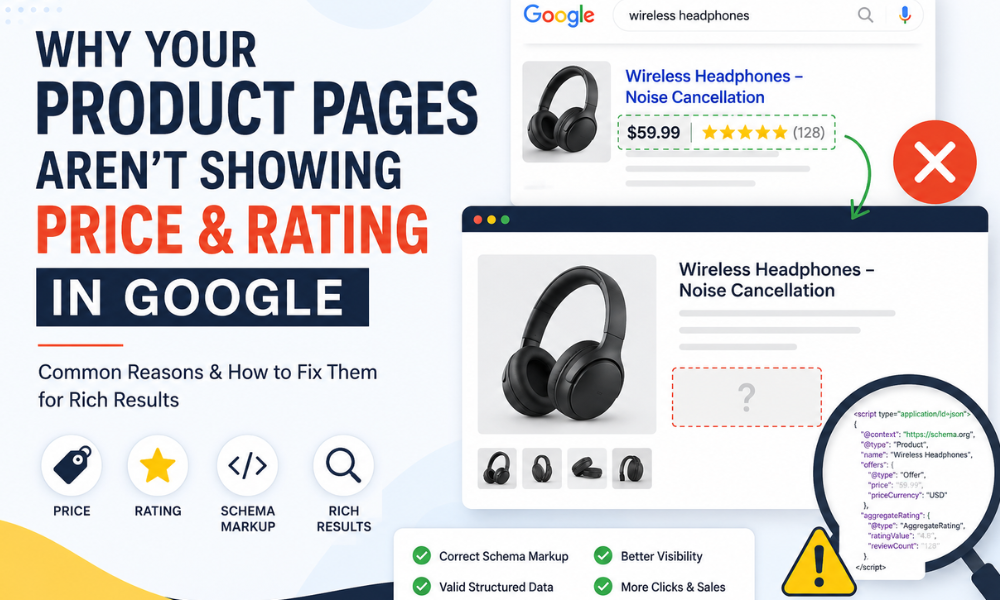
Why Your Product Pages Aren't Showing Price and Rating in Google
If you've ever searched for a competitor's product and seen those neat little stars and a price tag sitting right under their listing while your own page shows up looking plain and text only you know exactly how frustrating this is. You've done the work. You've got real reviews, real prices, a real product. So why does Google seem to be ignoring all of it?
The good news is that this almost never comes down to bad luck or some mysterious Google grudge. It's usually a fixable technical issue. Let's walk through the real reasons this happens, one by one.
It Starts With Structured Data, Not Design
Google doesn't "see" your page the way a person does. It doesn't notice your price because it's printed in bold near the top, or your rating because you've got a nice star widget from your review plugin. Google relies on structured data specifically schema.org markup to understand which piece of text on your page is actually a price, and which is a rating, and which is just decorative content.
So the very first thing to check is whether your product pages have Product schema (and AggregateRating or Review schema) implemented at all. A surprising number of sites either never added it, or added it once during a redesign and lost it somewhere along the way. If the markup isn't there, Google has no structured way to know it's looking at a rating versus, say, a customer's comment count.
The Markup Exists, But It's Broken
This is the more common scenario, honestly. The schema is technically present in the code, but something about it is off enough that Google either can't parse it or chooses not to trust it. A few usual suspects:
- Missing required fields. Google needs specific properties like price, price currency and availability for pricing to show, and rating value, review count for star ratings to appear. Miss even one, and the whole rich result can get skipped.
- Mismatched values. If your schema says the price is $49.99 but the visible page shows $59.99, Google treats that as a red flag. Same goes for ratings that don't match what's actually displayed to shoppers.
- JSON LD syntax errors. A missing comma or misplaced bracket can silently break the entire block, even though the rest of the page looks perfectly fine.
Running your URL through Google's Rich Results Test will usually catch these issues within seconds. It's honestly the fastest diagnostic step, and most people skip it far too long.
Google's Trust Threshold Is Real
Here's something a lot of site owners don't realize: having valid schema doesn't guarantee a rich result. Google has gotten noticeably stricter over the past couple of years, particularly around review markup, because so many sites were gaming it with fake or self authored ratings. If Google suspects your reviews aren't genuine, sourced from actual customers, or verifiable, it may simply choose not to display them, even if your code is flawless.
This is especially true if your rating data comes from a third-party widget that Google can't independently confirm, or if the reviews shown to users don't actually match the aggregate score in your markup.
Your Page Might Not Be Getting Crawled the Way You Think
Sometimes the issue isn't the schema at all, it's that Google hasn't recrawled the page recently enough to pick up recent changes. If you added markup last week, don't be surprised if it takes a bit for that to show up in search results. Rich results also aren't guaranteed even after correct implementation; Google decides case by case whether to display them, based on relevance, trust signals, and page quality overall.
It's also worth checking Search Console's Enhancements report for "Products" or "Merchant listings." This will tell you, page by page, whether Google has actually detected your structured data and whether it's flagging any errors or warnings.
What Actually Fixes This
- Confirm Product and Review/AggregateRating schema exists on every relevant page, not just a handful.
- Validate it with the Rich Results Test and fix every warning, not just the errors.
- Make sure the markup mirrors exactly what's visible on the page: same price, same currency, same rating.
- Use genuine, verifiable customer reviews rather than manufacturer fed content.
- Give it time, and monitor Search Console rather than assuming the first fix instantly fixes display.
Rich results aren't a switch you flip once. They're something Google continues to evaluate over time, based on trust, accuracy, and consistency. Get the technical side right, keep it right, and the price and star ratings tend to follow.
About us
We are Mindstory, Digital marketing company. We design thoughtful digital experiences and beautiful brand aesthetics.
Request a free quote
We offer professional SEO services that help websites increase their organic search score drastically in order to compete for the highest rankings even when it comes to highly competitive keywords.
More from our blog
View all stories



Why Your Product Pages Aren't Showing Price and Rating in Google 3